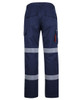
6MFRP - JB's FR PPE2 Biomotion Cargo Pant

(No reviews yet) Write a Review

SPEND & SAVE

UP TO 20% OFF*

  • 6MFRP - JB's FR PPE2 Biomotion Cargo Pant
  • 6MFRP - JB's FR PPE2 Biomotion Cargo Pant
  • Navy - Front - 6MFRP - JB's FR Ppe2 Biomotion Cargo Pant
  • Navy - Alternate - 6MFRP - JB's FR Ppe2 Biomotion Cargo Pant
  • 6MFRP - JB's FR Ppe2 Biomotion Cargo Pant
$173.25 inc. GST

Maximum file size is 524288, file types are bmp, gif, jpg, jpeg, jpe, jif, jfif, jfi, png, wbmp, xbm, tiff, psd, pdf, webp, ai, dst, eps, emb, svg

Frequently bought together:
Don't forget to check the size guide

Measuring Instuctions (Guide Only)

This guide explains the different terms used in garment size guides and shows you how to take your own measurements when choosing your fit.

Please Note: This is a general guide only, please refer to specific sizing instructions for your desired garment in the product descriptions section or style sheet.

If you would like to share feedback about this page, please contact us directly via the link below: Ask us about sizing

Tops

T-Shirts, Shirts, Blouses, Sweaters/Jumpers, Hoodies, Cardigans, Polos, Tunics, Crop Tops, Tank Tops/Singlets, Camisoles, Vests, Tube Tops, Bodysuits, Activewear Tops

How to Measure Half Chest (Garment Measurement) for tops

The "half chest" measurement is taken directly from the garment itself, not your body. It's a key indicator of how wide a top will be. A top's "half chest" measurement is taken when laid on a flat surface and measured arm pit to arm pit.

What you'll need:

  • A top you want to measure (e.g., a t-shirt, shirt, or jumper)
  • A measuring tape (cloth or flexible metal)
  • A flat surface (e.g., a table or clean floor)

Instructions:

  1. Lay the Garment Flat:
    • Place the top flat on a clean, hard, and even surface.
    • Smooth out any wrinkles or creases, ensuring the front and back layers are perfectly aligned and not bunched up.
  2. Locate the Armpit Seams:
    • Identify where the sleeve seam meets the main body of the top, 2.5cm below the armpit. These are your starting and ending points.
  3. Measure Across:
    • Take your measuring tape.
    • Place one end of the tape precisely at the point where the armpit seam starts on one side of the top.
    • Stretch the tape straight across the front of the top, ensuring it remains flat and horizontal.
    • Read the measurement at the point where the armpit seam starts on the opposite side.
  4. Record the Measurement:
    • This figure is your "half chest" measurement.

Half Chest Measurement Diagram
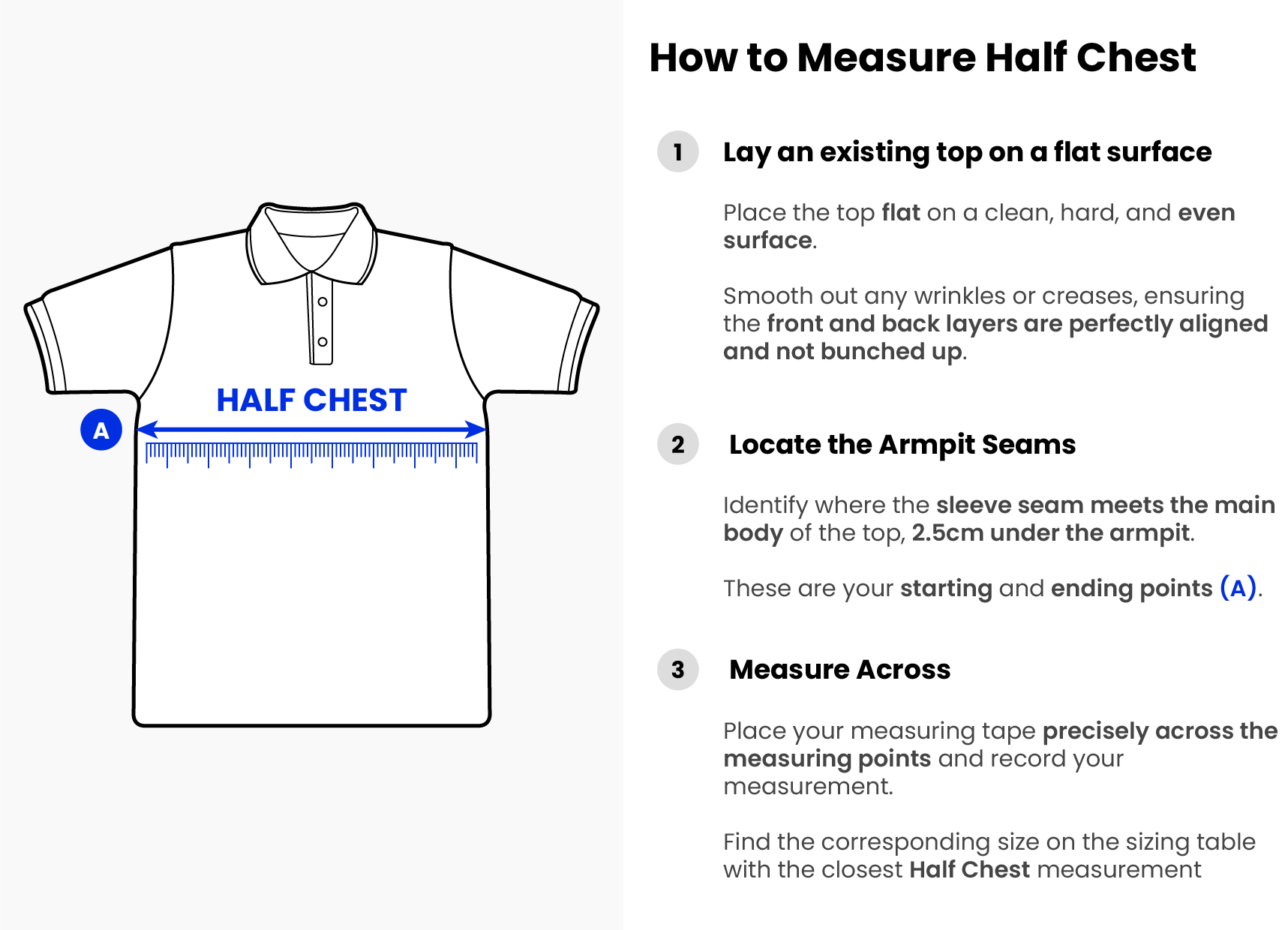
How to measure half chest (Garment Measurement)

Lowers

Trousers, Pants, Jeans, Shorts, Skirts, Leggings, Jeggings, Capris, Culottes, Track Pants, Cargo Pants, Chinos, Boardshorts, Swim Shorts.

What's a Half Waist Measurement?

Put simply, a half waist measurement is half the circumference of your waist. Instead of measuring all the way around, you're measuring from one side of the waist to the other when the garment is laid flat.

How to Take a Half Waist Measurement (Step-by-Step)

You'll take this measurement on a garment, not on a person. Here's how you do it:

What you'll need:

  • A flat surface (a table or clean floor works a treat)
  • A measuring tape (cloth or flexible metal)

Steps:

  1. Grab your Garment: Lay the garment you want to measure (trousers, skirt, shorts, etc.) flat on your clean, smooth surface.
  2. Smooth it Out: Make sure there are no wrinkles, puckers, or folds in the waistband. You want it as flat and even as possible, just like it would sit when worn.
  3. Locate the Waistband: Identify the top edge of the waistband. This is the part that would sit around your natural waist or where the garment is designed to sit on your body.
  4. Align Your Tape: Place one end of your fabric measuring tape at one side of the waistband, right at the outer edge. Make sure it's snug against the fabric but not stretching it.
  5. Measure Across: Run the measuring tape straight across the very top edge of the waistband to the opposite outer edge.
  6. Read the Measurement: Take your reading. That's your half waist measurement!

Half Waist Measurement Diagram
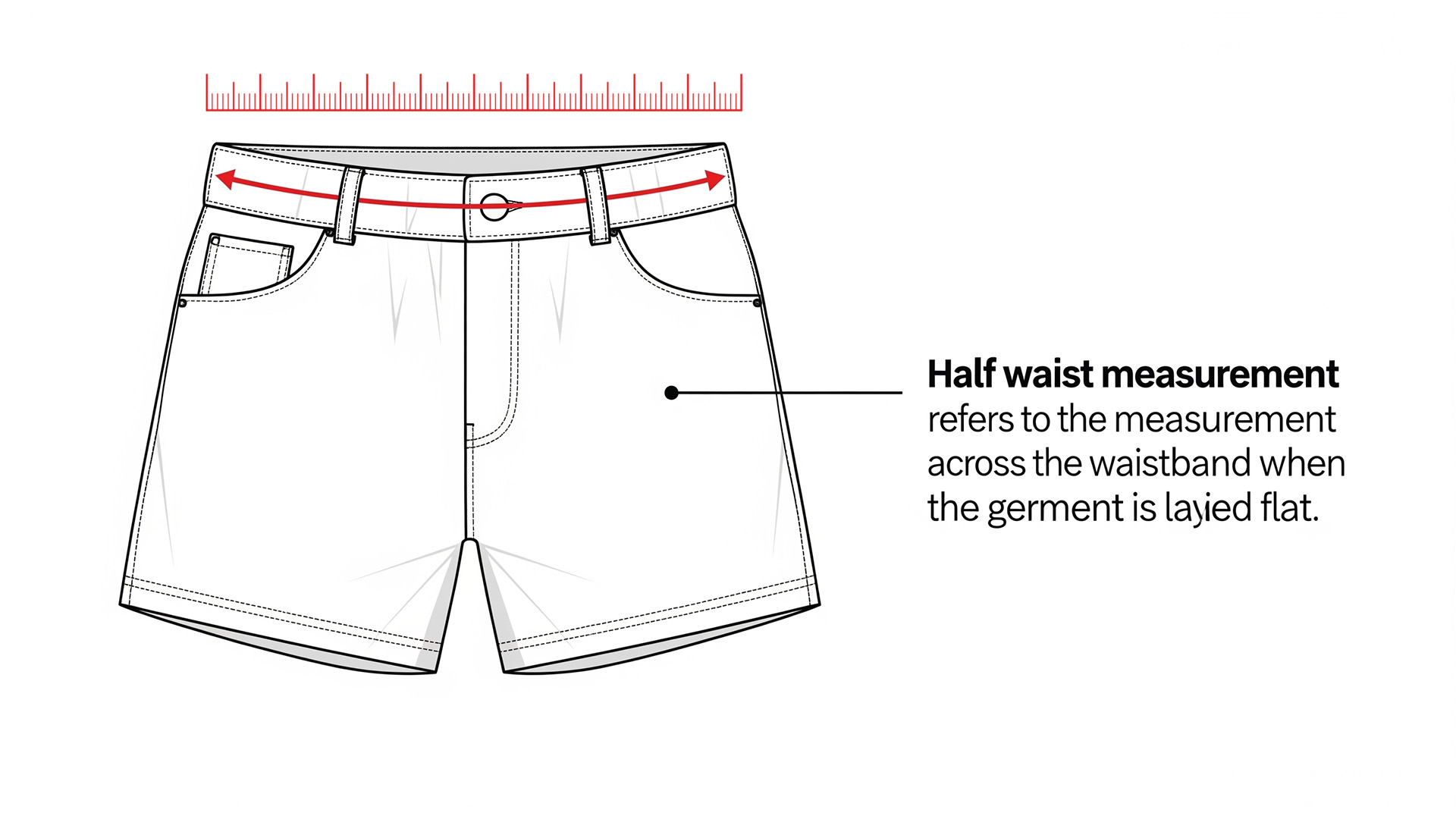
How to measure half waist (Garment Measurement)

Description

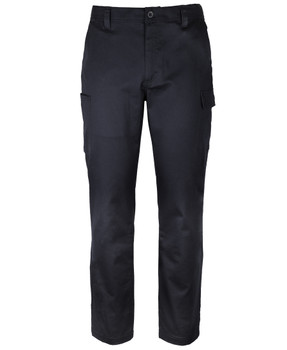
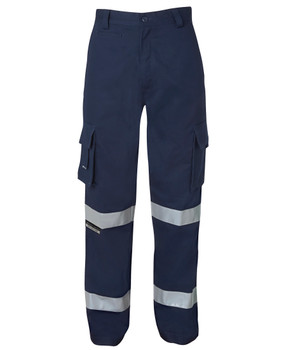
Stay protected on the job with the JB's FR PPE2 Biomotion Cargo Pant, built from inherent FR fabric that guards against heat, flame and arc flash hazards without weighing you down. The Biomotion reflective tape design flexes with your movement for all day comfort on site, while dual cargo and hip pockets keep tools and essentials within easy reach. Rated for UPF protection and certified to multiple international safety standards, this pant is engineered for demanding industrial environments where reliability matters most. A hardworking pant that moves with you and protects where it counts.

Material

  • Lenzing cellulosic fiber/modacrylic/aramid/anti-static twill ripstop fabric, 220gsm

Features

  • Classic fit
  • Inherent FR fabric
  • 2 cargo pockets with flap and FR hook&pile closure, left leg pocket with pen insert
  • 2 hip pockets with flap and hook&pile closure
  • Segmented FR reflective tape on knee and ankle for biomotion effect

Safety Standards

  • Complies to AS 4399:2020 for UPF protection
  • Complies to AS 4602.1:2024 N-E Level 3 when worn with Level 3 torso garment
  • Tested to ISO EN 11612:2015 Protective - Clothing to protect against heat and flame A1, A2, B1, C1
  • Certified to EN1149-3:2018
  • Tested to IEC 61482-1-1:2018 Protective clothing against the thermal hazards of an electric arc (arc flash protection), ATPV 13 CAL, PPE 2
  • Certified to NFPA 2112 UL

Sizes

  • Regular: 77R - 112R
  • Stout: 87S - 132S

Fit

  • Classic Fit

Size Guide

SIZE 77R 82R 87R 92R 97R 102R 107R 112R 87S 92S 97S 102S 107S 112S 117S 122S 127S 132S
Waist (cm) 80 85 90 95 100 105 110 115 90 95 100 105 110 115 120 125 130 135
Inner Leg (cm) 74 77 79 80 81 82 83.5 85 71 73 75 78 80 81 81.5 82 82.5 83

*ALL MEASUREMENTS ARE APPROXIMATE AND ARE FOR REFERENCE ONLY. COLOURS ARE REPRODUCED AS CLOSELY AS PRINTING ALLOWS.

View AllClose

Additional Information

Style:
Pants
Type:
Lowers
Reflective Tape:
Biomotion
Safety Class:
Flame Resistant
Safety Class:
Night Only
Hazard Risk:
HRC/PPE 2
Arc Flash Rating:
ATPV 13
Age Group:
Adult
Gender:
Male
Decoration:
Embroidery
Promotion:
Spend & Save
Reflective Tape:
Hoop Pattern
View AllClose

0 Reviews

View AllClose

Frequently Asked Questions

You can view all frequently asked questions here

Turnaround time?

We recommend allowing up to 10-15 business days* for the decoration and dispatch of your order. Please note that non-decorated orders are typically delivered much sooner. Deliveries to remote areas may take longer.

*In the rare case that a stock delay occurs, our team will contact you to advise a restocking ETA for your approval.

For your convenience, your order may arrive in multiple shipments if items are dispatched from separate warehouses.

For new customers utilising our decoration services (Screen Printing, Embroidery, or Heat Transfers): Your order will require artwork set-up prior to production. The time required for this set-up may vary depending on your specific artwork requirements.

If you require delivery by a specific date, please contact us prior to placing your order. contact us

Can you do urgent orders?
Yes, in a lot of cases we can facilitate urgent orders!

Please consult with our customer service team before placing your order online.

Our friendly team will assess your requirements to determine an ETA.

Start a discussion with our team by contacting us here

Can I get a proof/mock-up when I place my order?

Absolutely, for new logos, the artwork set-up service fee includes an artwork proof for email approval prior to production.

Production will only commence upon your written approval via email.

If you have any questions before placing your order, please contact us here

Can you change my logo colours or remove the background?

We sure can, colour changes and background removal is included in the Artwork Set-up Fee for new logos. If you have any special requests regarding your logo, be sure to include instructions in the comments box either on the product page or at checkout.

Colour Changes

Our team are proactive in selecting high contrast colours to ensure your logo is legible on the garment(s) you've ordered.

Lets say you order a black garment and upload a version of your logo that is black. In most cases our team will proof a white version of your logo however, we can also proof a different colour upon your request.

Some orders may have light and dark garments, in this case our team will proof a light and dark version of your logo to ensure high contrast and legibility for each shade of garment.

Background Removal

We are frequently provided logo files with a solid background (ie white or black) that is clearly not intended to be included in the final product.

In most cases our team will proactively remove the background however, if there is any uncertainty, one of our team members will contact you directly for confirmation before proofing your order.

Production will only commence upon your written approval via email.

If you have any questions before placing your order, please contact us here

Can I get a multiple logos on a garment?

You sure can, here is a breakdown of our decoration options:

Embroidery

  1. You can add your first logo using the built in embroidery options on our product pages.
  2. Now you can add an additional logo here, please make sure you match the quantity of the garments you wish to apply additional logos to. Please use the comments text field on this page to include any special instructions.

Alternatively, you can chat with our team if you need assistance with your order.

Heat Transfers

  1. You can start your order for Heat Transfers here.

There are detailed instructions to help guide you with your order.

Alternatively, you can chat with our team if you need assistance with your order.

Screen Printing

Start your FREE Screen Printing Quote here

Mixed Decoration *Example: Front Embroidery and Large Back Screen Print

Our team are here to help! Start your FREE Quote here

Why is there an artwork set-up fee for new logos?

At Online Workwear, achieving a flawless reproduction of your logo is our top priority. The one-time artwork setup fee is the first and most crucial step in guaranteeing a professional, high-quality finish for your custom apparel.

This fee covers the technical service performed by our in-house graphics department to translate your logo into a production-ready format for our advanced machinery. This isn't a simple file conversion; it's a specialised process that ensures your design looks crisp, clean, and exactly as you intended.

What's Included in Your One-Time Setup?

  1. Professional Digitisation or Vectorisation:
    Our designers manually recreate your logo in the precise format required. For embroidery, this means "digitising" a file that maps every single stitch. For printing and transfers, we create a "vector" file that allows for perfect scaling without any loss of quality.

  2. Digital Mock-up for Approval:
    Before production begins, we send you a digital proof showing how your logo will look on the product. This gives you the opportunity to review the size, placement, and colours.

  3. Complimentary Artwork Amendments:
    We include minor revisions to ensure you are completely happy with the mock-up before we proceed.

*Please be aware, in some cases additional artwork proof amendement fees may apply, please contact our team if you have any questions about artwork set-up.

Once we have prepared your logo, it's kept on file for you. Repeat orders using the same logo will never incur this fee again.

Repeat orders using the same logo won't incur this fee. Colour changes to existing files are free. If you have any questions regarding embroidery set-up, please contact us

Do you offer screen printing?

Yes, we certainly do! We're proud to offer in-house screen printing services.

If you're interested in ordering custom screen printing, please click on the following link to get started: 

Screen Printing Services

How do I order heat transfers?
  1. Add your desired garments to your cart
    *Be sure to check all items in your cart are correct before proceeding. *Make sure all colours, sizes and qunatities are correct.

  2. Click Add Heat Transfer and follow the prompts to choose your desired transfer options.
    *Be sure to specify the correct quantity of transfers, this should match the quantity of garments you want decorated in your order.

  3. Repeat the previous step if you require multiple positions*
    ie. Left Chest Print and Back Print

Order sorted, we'll take it from here!

To get help with an order or ask a question, please contact us

Do you offer discounts?

Absolutely, we're frequently offering specials and bulk purchase discounts.

Start shopping our discounts and promotions at our Workwear On Sale page

Need assistance from a team member?

We are only a few clicks away!

Ask Us a Question

5-star Service

See what our customers think!